
Syncify · Dropshipping and store synchronization
Are you facing problems with connected stores?
Syncify solves dropshipping and multi-store synchronization problems. Destination stores can sell Source Store products, send matching orders back for processing and fulfillment, and keep products, media, variants, prices, inventory, and orders updated automatically.
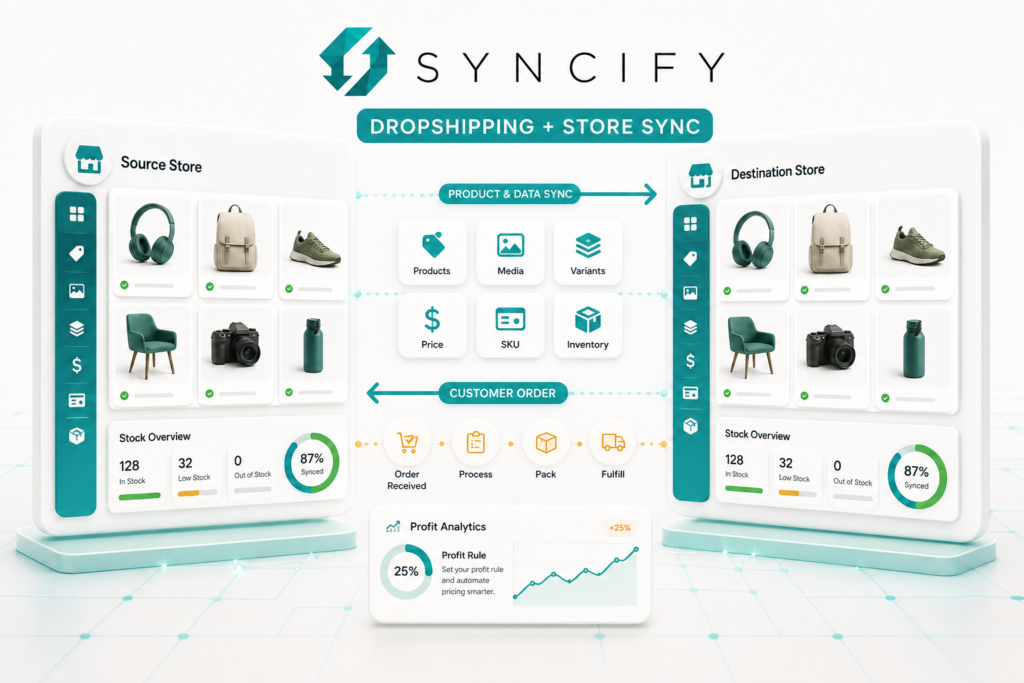
Everything Syncify connects
between stores.
Source and destination stores
Use a main or supplier store as the Source Store, then connect one or more Destination Stores.
Dropshipping order routing
When a synced product sells in a Destination Store, Syncify can automatically create the matching order.
Profit rules and analytics
Set a profit percentage for a Destination Store and see its calculated share in analytics.
Complete product synchronization
Sync products, product details, images, videos, variants, SKUs, and prices from the Source Store to connected destinations.
Inventory and stock updates
Keep inventory aligned across stores so stock changes in one connected workflow update the relevant destination products.
Order synchronization
Keep orders connected between stores and send destination sales back to the source workflow when dropshipping is enabled.
Product lifecycle updates
Propagate product edits, catalog updates, and product deletes so merchants do not have to repeat the same work in every store.
Centralized multi-store control
Manage store connections, synchronized products, inventory, orders, and workflow status from one Syncify experience.
Choose the plan that
fits your store.
Starter
For Smaller Catalogs-
Sync up to 100 products
-
Source and destination workflows
-
Product settings controls
-
Real-time webhook status updates
Growth
For growing operations-
Sync up to 1,500 products
-
Source and destination workflows
-
Product settings controls
-
Real-time webhook status update
Unlimited
For large Catalogs-
Sync unlimited products
-
Source and destination workflows
-
Product settings controls
-
Real-time webhook status updates
Data access required to operate.
1. Store owner
Store owner contact details required for connected-store administration.
2. Products and media
Products, details, collections, images, videos, variants, SKUs, prices, and product lifecycle updates.
3. Inventory
Stock levels and inventory updates across connected locations.
4. Orders
Order data used to synchronize orders and create the matching Source Store order for fulfillment.
5. Custom data
Metaobject definitions and metaobjects used by connected workflows.
5. Locations
Shopify store locations used for inventory and fulfillment context.
Common questions about Syncify.
01. What is the difference between Dropshipping and Synchronization?
Dropshipping lets a Destination Store sell products from a Source Store and sends matching customer orders back to the source for fulfillment. Synchronization keeps product information, stock, updates, deletes, and orders aligned between connected stores.
02. What is a Source Store?
The Source Store is the supplier or main Shopify store. It owns the primary products and receives dropshipping orders from connected Destination Stores for processing, packing, and fulfillment.
03. What is a Destination Store?
A Destination Store sells products synchronized from the Source Store. When a customer purchases a synced product, Syncify can create the corresponding order in the Source Store.
04. What happens after a dropshipping customer places an order?
The customer orders from the Destination Store. Syncify can create the same order in the Source Store, allowing the source business to process, pack, and fulfill it.
05. How do profit rules work?
The Source Store can define a percentage-based profit rule for the Destination Store. If an order total is 1,000 and the rule is 15%, Syncify calculates and shows 150 as the Destination Store profit in analytics.
06. What information can Syncify synchronize?
Syncify can synchronize products, product details, images, videos, variants, SKUs, prices, inventory, orders, product updates, product deletes, and inventory updates.
07. What happens when a product or inventory value changes?
When a synchronized product is edited or its inventory changes in the Source Store, Syncify can update the connected Destination Store so merchants do not have to make the same change manually.
08. Can Syncify synchronize product deletion?
Yes. Product lifecycle synchronization includes product updates and deletes, helping connected catalogs remain consistent.
09. Which plan should I choose?
Starter supports up to 100 products, Growth supports up to 1,500 products, and Unlimited removes the product limit. Choose based on the number of products your connected workflow needs to synchronize.
10. Where can I manage connected stores?
Syncify brings store connections, synchronized products, inventory, orders, profit analytics, and workflow status into one app experience.
Built and supported by Ecomatives